Flight Simulator Instruments
This section provides an overview of the panels that can be used to build a cockpit which closely resembles the real thing. No longer will you need to click a button with your mouse,
and there won’t be any gauges cluttering the outside view either. All of the modules are Microsoft FS2004/FSX compatible.
1. Entry Level Instrument Panels
These Saitek modules are appropiate for the simmer who wants more then a simulated instrument on a computer monitor.
The Saitek PRO flight product range is easy to use and adds a lot of realism to the simulation experience without driving you at very high costs.
|
Name |
Saitek PRO Flight Switch Panel |
Saitek PRO Flight Radio Panel |
Pro Flight Instrument Panel |
Saitek PRO Flight BIP Backlit Information Panel |
|
Description |
Upgrade the flight simulation experience for Microsoft Flight Simulator X with
the Saitek Pro Flight Switch Panel. Whether attached to the Saitek Pro Flight
Yoke System, free standing on a desk or mounted into your own cockpit setup, the
Pro Flight Switch Panel is an ideal way to expand the number of controls for
your flight simulation experience. Control your landing gear, engine power, landing
lights and 11 other important aircraft functions from one compact unit. |
You can upgrade the flight simulation experience for Microsoft Flight Simulator
X with the Saitek Pro Flight Radio Panel. |
Instrument Panel can display six of the main cockpit
instrument panels from Microsoft’s Flight Simulator X. Features a 3.5” colour LCD
screen.
Use one or more, depending on what you want to view simultaneously. |
Upgrade the flight simulation experience for Microsoft Flight Simulator X with
the Saitek Pro Flight Switch Panel. Whether attached to the Saitek Pro Flight
Yoke System, free standing on a desk or mounted into your own cockpit setup, the
Saitek Pro Flight Switch Panel is an ideal way to expand the number of controls
for your flight simulation experience. Control your landing gear, engine power,
landing lights and 11 other important aircraft functions from one compact unit. |
|
Features |
- Flight switch panel for flight sims
- Engine on and off switch
- Landing gear and cockpit control switches
- Works with Microsoft Flight Sim X
- Compatible with XP, XP64, and Vista
|
- A set of switches and LED displays for use in controlling various aspects of flight
simulationIncludes: COM1/COM2/NAV1/NAV2 function and DME/ADF/XPDR functions.
- Works with Microsoft Flight Simulator X and 2004.
- LED displays work fully in real time with Flight Simulator X and 2004, removing
the need to bring the radio stack up on screen.
- Standby switch - set your standby frequencies and then set to active at the touch
of a button.
- Twin concentric adjustment dials adjust frequency units incrementally for the quicker
selection of your required frequency.
|
-
Choose between six different flight instruments at
the touch of a button
- Altimeter
- Attitude Indicator
- Airspeed Indicator
- Compass
- Turn and Slip indicator
- Vertical Speed
- Compatible with Microsoft’s Flight Simulator X
- Works with Windows XP, Vista and Windows 7
|
- Backlit annunciate Panel.
- 24 Individually controlled segments.
- Three user defined colours - Red, Orange and Green.
- Over 70 different legends included in the box.
- Works with Microsoft Flight Simulator X and 2004.
|
|
Interfaces |
USB |
USB |
USB |
USB.
|
|
Pros |
- Easy to use
- Much more realistic flight operations
- Competitive pricing
|
- Compact and easy to use solution
- Much more realistic flight operations
- Simulates all radio functions with only one module
|
- Many instruments in one device
|
- Good looking.
- Easy to use and setup.
- Much more realistic than on screen signalling.
|
|
Cons |
- Not very well suited for turbine engine powered aircraft.
|
- Can use only two radio functions simultaneously
|
- Slow response time.
- Expensive
|
- Not every signal type is supported with an out of the box display unit.
|
|
Shopping |
|
|
|
|
2. TFT-based Instrument Panels
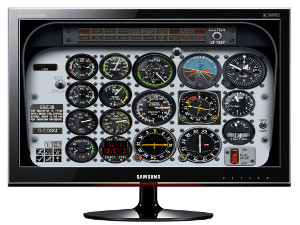
A TFT-based instrument panel is a very good alternative when it comes to quality versus price. Most flight simulation programs have a way to display the instrument panel on a separate monitor.
This way, you have your instruments, looking good in high resolution, on a panel straight away! A further enhancement is the option to hide the TFT panel behind a cockpit panel with holes cut out at the right spots for the relevant gauges.
FlightGear, for example, comes with a utility that lets you place gauges on a TFT panel for this purpose only.
3. (Semi)-professional Instrument Panels
3.1 Radios
This flight instrument equipment approaches a very high degree of realism, both in terms of function and form. It is used by the most demanding DIY flight simmers and professionals alike.
|
Name |
Flight Link Helicopter TR-1 Avionics Stack |
SimKits Radio Stack Tower |
|
Price level (approximately) |
$1850 |
EUR 3450 |
|
Description |
The TR-1 Avionics Stack is our most affordable
avionics panel. With high intensity red LED (light emitting diodes), the TR-1
is the most inexpensive digital avionics stack on the market. The TR-1 contains
the standard radios found in most aircraft and is a must have for a pilot who
wants IFR training. All buttons and switches are fully functional. |
TRC's Radio Stack RS372 for Flight Simulation is so realistic that you can hardly tell the difference between the
simulated Radio Stack and the real Bendix King Silver Line* products. Modelled after the most popular Radio Stack,
as used in the Cessna 172 Skyhawk*, all of the details are reproduced extremely closely to the exact dimensions of the original radios.
The stack is constructed as a modular system. Each radio is a separate module and connected via a ribbon cable to the built-in Radio Stack Controller,
which is a microprocessor board that connects to your PC via USB running Flight Simulator Software. You can therefore change the order of how the radios fit in your panel.
|
|
Features |
- Realistic dual concentric radio knobs.
- Six red indicator LED’s.
- Generic COMM receiver.
- Two generic NAV receivers.
- Generic ADF receiver.
- Generic DME receiver.
- Generic transponder.
- Generic autopilot w/ ALT, HDG and NAV holds.
- OBS 1 & 2, altimeter and DG concentric knobs.
- Individual marker beacon lights.
- Fully functioning red and green gear lights.
- All metal case with an industrial finish.
|
- KMA28 Audio Panel.
- KX155A NAV/COM1.
- KX155A NAV/COM2.
- KN62A DME.
- KT76CT Transponder.
- KR87 ADF.
- KAP140 Autopilot.
|
|
Interfaces |
USB |
USB |
|
Pros |
- All generic radio function available in one unit.
- Targeted at professional market.
- Competitive pricing.
|
- All generic radio function available in one unit.
- Modular system; each units closely resembles specific radio equipment.
- Targeted at professional market.
|
|
Cons |
- Also incorporates gear and marker beacon status LEDs, potentially breaking modularity.
|
- High price level when using all of the modules.
|
|
Shopping |
|
|
3.2 Gauges
The most realistic level of simulation is to actually build an instrument panel with real switches and gauges. Of course, these gauges are under the software control of the flight simulator,
but feel like and closely resemble the real ones. This is also the most expensive and labour intensive option. The gauges can be purchased from an Original Equipment Manufacturer (OEM).
In the early days of flight simulation, all manufacturers used some sort of proprietary system to connect the gauges to an interface device that
supported a USB (or another serial link) to connect to the flight simulator program. These days, most gauges all have their own USB connector (note that this means that they all have
their own microprocessor and firmware on board). A separate power supply is used to power the gauges' servos.
Comments are disabled.